Monday, April 7, 2014

Symphony W68 Stock Recovery

Flash Recovery cwm to Stock. Download This file and Extract it.
Put your SD card.
Open mobile Uncle tool. and click Recovery Update.
After click you show recovery.img
Now click this and Flash this.

Download This File


Read More

Sunday, April 6, 2014

Today we are share to you how to root symphony w68 and install custom recovery. Its important for new android user. If you install CWM. you can backup your stock room and flash any custom firmware for w68.
If you backup your custom room when brick your set for your any fault you can restore your backup file and your set again properly on. So its too important for any new android user.
So lets start how to root your w68 and install CWM.

First time you saw my post, How to Root w68

After complete your Device Rooted. Then install CWM.
Now we are showing on how to install CWM (Custom Recovery)

At first Download Mobile Uncle Tool
and install it.
After Complete install.
Download CTR Recovery

After complete download CTR recovery then open this file and extract it.
Now you saw a File Recovery.img
put this file your android SD card, Not put any folder just put outside in SD card.

Now open Mobile Uncle tool and show this screenshot.


Now click Recovery update... Off your mobile Data Connection.

Now you saw a Recovery.img. Click this and press Ok.

Now Reboot your mobile. And press volume up and power button.
Now saw your CWM :)

Enjoy..


Read More

Saturday, April 5, 2014

Symphony W68 Custom Firmware (Sony Xperia Z)

Today we are share to you mega post :) We are given to a Custom Firmware for symphony w68.
Its too Imagine and awesome firmware. Its like fully Sony Xperia Z.
Its Have a no any bugs and also good.
This Firmware are changed Items:

** New Boot Logo.
** New Boot Animation.
** New wallpaper.
** changed everything like Xperia.
** Xperia Music player.
** Xperia photo viewr.
** Xperia camera.
** changed Dialer.
** Changed call receive and end button.
** More

Some Screen shot:


Now Follow the rules and flashing your Rom

1) Download ROM
2) Put into External SD Card
3) Go To CMW or CTR Recovery
4) Wipe Data/Factory Reset And Wipe Partition
5) From Advance Menu Do Dalvik Catch Clear.
6)Go to mounts and storage then format system/cache/data
7) Select Intall From SD and Select File And Click YES
8)After Complete Reboot Your System
9)Done
10)It will take upto to 3 minutes for booting up for the 1st time…

 Download Firmware


If you saw  any problem leave me replay.


Read More

Monday, March 31, 2014

How To support Bangla in Samsang Device

Today we are showing on to you, How to support bangla any android phones. Its Too easy to support bangla in your device.
First method : Download This File

Now installed this software in your phone. After complete installation, you go to setting > Display > Fonts.
Now select Bangla Font and Restart your phone. And see Effects.


Thank You :)
Read More

Sunday, March 2, 2014

Airdrroid The Best Android Manager For PC

Now we are share to you a best android manager For your Android. Its really a good apps.
But Its just need a wifi. Connect your mobile wifi via your computer wifi router or hotspot.
and open airdroid and u see a ip address.
The ip address put your computer browser search bar and search it..

Now sawing on your mobile and a notification like my 1st screen shot picture.
Accept connection...
After Accept u see it your computer browser..


 Download This File Here
 Install Your Mobile and Enjoy This Apps :)


Read More

Cam Scanner (Android)

Today we are share to you a best Document Scanner For Android. We are all time used computer scanner when our need to a paper scan. But now we are scan our paper or documents via mobile :D Its a great apps i used it. So if u want this u can download this File and scan your any document and see magic........
Download This File


Enjoy :)
Read More

Saturday, March 1, 2014

How To Change Log in screen (windows 7)

Now we are share to you a different post......!
How to change log in screen change in you windows 7 operating system...?
Solve it now.. Its too easy.. So if u want to change your log in screen then lets start..
At First Download This File

Now Extract it and open folder.
Click InstallTakeOwnership and install this file..
Then Press Yes..
Now Open Win7LogBackgroundChanger...

After open you see that.. Its my computer log in screen..
You choose any image to to your hard drive and apply...

 I choose photo from my hard drive and apply...

After apply press= Ctrl+Alt+Del
And see magic...
If you see any problem plz comment...


Read More

Friday, February 28, 2014

Nokia E63 Custom Firmware (symbian)

Today we are share to you new Firmware For Nokia E63. Its look like very nice and imagine..
If you want to custom firmware you use it...
This Firmware Changed items:

1. Windows 7 Ultimate Startup and Power off.
2. Use Heavy Effect.
3. Permanently Hacked system.
4. Custom Font Used.
5. Visual theme with animated theme.
6. No bug fixed and given new updated.

Some Screenshot:


Download This File Here:
Custom Firmware 
Full Efects
Bug Fixed Updated

Download file and flash it..
And see effects :)
If u have showing any problem.. you can contact to me..
Thank you..
Zip Password: k0pl4xz


Read More

Easy Touch Iphone Style (Android)

Now We are share to you imagine a software. Easy Touch Iphon style For android.
★ What is Easy Touch?
Easy Touch Not a Widget!
Easy Touch is a button which looks like Assistive Touch on iPhone, and it's All Free!
It floats on your phone screen(floats on others app), you can move it to any where.
★ What Easy Touch can do?
Easy Touch provides a very convenient way to:
★ Quick settings(Change your phone settings like turn on Wifi, change screen brightness and so on).
★ Open your favour app.
★ Go to Home Screen.
★ Back button(need Root support).
★ Menu button(need Root support).
★ Lock Screen(sorry for some problems on Galaxy s3 and some 4.0.+ Android OS).
★ App list.
★ Open recent task(double press).
★ Task manager(Kill task,need Root support)
★ Memory optimize(Ram optimize)
★ Time display
★ Clean cache
Download This File Here

Read More

Thursday, February 27, 2014

Now I am share to you How To Turn Off USB to your computer without any software.
We can disable USB in your computer without any software..
So lets start...
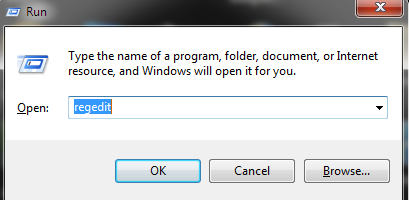
At first Go to Windows Run menu..

Then write regedit and click ok..


Now Open Register Editor:

Now you see many red signs on my screen shot...
First Go to HKEY_LOCAL_MACHINE > SYSTEM > currentControlSet > Services...


 After click services then find USBSTOR..
Now You see many option to Right hand window. Click start and modifying that..
You see value data 3 its makes to 4..

Now press ok and close all window..
Restart your computer and see magic :) Insert any pendrive or USB device.
Device are not worked..
Now you want to USB device work same option value data 4 to makes 3 and ok..
and restart computer..
Thank You..


Read More

Wednesday, February 26, 2014

Hidden Eye (Android)

Today we are share to you a great apps for android. This apps name is Hidden Eye.
Its just imagine apps. This apps worked when u lock your phone in home and if anyone try to unlock your phone.. u can understand it. This apps capture whose person picture who try to unlock your phone. when u unlock your phone u see whose person picture and u understand who try to unlock your phone :)
 Download This File

Now install this your phone and open it...


Now click ON and Mark Alert me on Notification Bar.
Click Active on Device Administrator...
Now Complete this..
Now you can try to wrong code to unlock your phone..
and see magic ;)


Read More

Wifi Mouse for Computer (Android)

Now we are share to you a MEGA POST!!! This apps working just Android User. If you used this apps u can Control virtual mouse for your computer. So its a great apps.
At first your need to a Wifi Router or wifi device.
Now Download Mouse Server For your computer.
Download This File Here

Now Download Wifi mouse for your Android Phone.
Download This File Here

Now Download mouse server and install file..
Now you can see a Ip address.. 192.168.0.** this type.

Install apk in your mobile and open it.
Now type ip and click connect and see the magic ;)

Read More