Showing posts with label Android Tips. Show all posts

Saturday, June 14, 2014

CWM Recovery For your Samsung galaxy S dous 2

Many days after we are coming..Today we going to show you How to Update Your Samsung Galaxy S dous 2. Model no- GT-S7582. This recovery are new version. And you can easily updated via odin.
If you updated your Recovery you can do this anything safely.. You can backup your full system and rom.
So Don't waste time... Lets Start How to Install CWM on your Samsung galaxy s dous 2.

Warning: Its Only for Samsung GT-S7582. Don't Try to other device.

 At First Download 3 Some File:
Samsung USB Driver
ODIN
Recovery

After Download..install USB driver to your computer.
Extract Recovery zip file.
Open your odin.
Turn off you device and press volume down button + Home button + Power button.
After showing fast boot. Press volume up button for continue. Now you are showing on your Display downloading mode.
Connect your phone via USB cable and waiting for installing driver.
Now following some screen shot:
After open Odin, unmarked 2 red sign item..
 

Then connect your mobile Downloading mode to computer...
Then you saw this screen shot:


Now click to PDA and select to recovery.tar.md5 
 

Now click to start and wait some minutes..
After you successfully install recovery you saw green sign PASS!
 

Now exit odin and restart your mobile.. and press volume up button + Home button + Power button..
Now see your Recovery :)






Read More

Wednesday, May 21, 2014

Wooden Desert Custom rom for (Symphony w68)

Today we are going to give you again a Custom Firmware.. For symphony w68. Its Customized For Symphony w68... Its a awesome  Custom FIrmware..This firmware have  no bugs. And it's 100% Tested। So you can flash this rom to your symphony w68. So lets Start and Flashing your Firmware.

Download This File

This Firmware Features:

 ** Pre Rooted.
** Bug Fixed.
** New Boot Logo.
** New Wallpaper Added
** New Theme Added.
** New Icon Added.


Following Some Screen shot:


  Now we are get to Flashing Steps:

* Got to CTR Recovery.
* Clean Wipe/Data Factory reset.
* Wipe Cache partition.
* Go to Advanced menu and Clear Delvik cache.
If Your don't have to CTR recovery. And Don't know how to Flash CTR Recovery or CWM. 
Click This Link... 

 After Flashing Steps. Reboot your system. And Enjoy!!!

Warning: Must Backup your STOCK ROM.


Read More

Tuesday, April 15, 2014

Boost Up Your mobile ram (512 to 918) (Rooted)


Today we are share a again mega post!! Today we are share to u how to boost up your ram 512 to 1gb. Its 100% working. And Fast your phone, and  playing HD Game without any lag. And your mobile ram build up 1gb ram! So why u miss this?? So lets Start..

At First Dwonload This File

Warning: Your mobile have to must be rooted. Other wise Don't Work it.
 Note: And You have to must class 10/8 memory card, other wise don't work.

Now Download Busybox For Your mobile.

Busy Box 

Install Ram expander and Busy box. 
Now open Busy box and following screenshot :

Open Busy box.. Click Red cross icon and close this.
Now Click Install...


After install you show this message...


Now we are getting second steps...
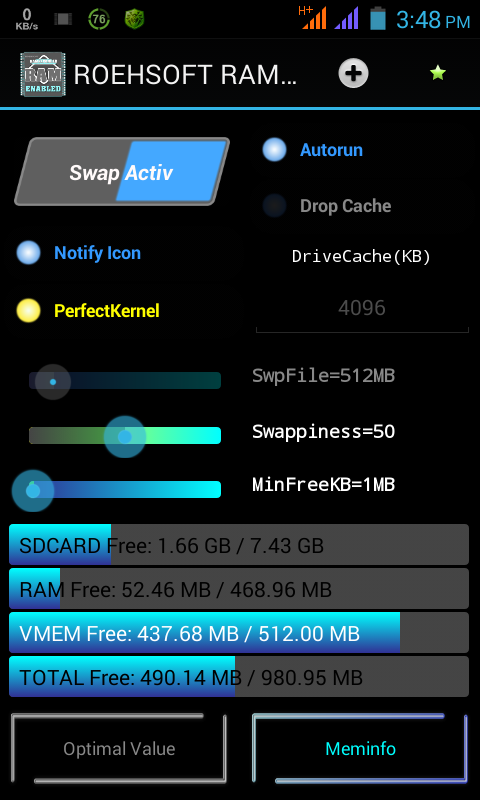
Open Ram Expander..


Its working screenshot.. Your new Ram expander don't show this. When you open ram expander click swap Active and its creating a swap file for your virtual ram. Its Create on your memory card. Don't Delete this.
After Creating you saw a massage.

Warning: Some mobile can't support virtual Ram for kernal  mismatching. 

If its working successfully its Turn on automatically.

So do this first and boost up your Ram :)


Read More

Thursday, April 10, 2014

Symphony w68 Custom Firmware (IOS 7)

Today we are given to you again a mega post!!! We are share to you a Custom Firmware For Symphony w68. Just Like IOS 7. Its Just imagine a Custom Firmware. We will given to a already 2system custom firmware. Now we are given to 3system custom Firmware like IOS 7.
So Lets start How to Flash It.

This Firmware Features:

* Super Smooth Touch.
* IOS 7 Launcher.
* Iphon Dial Pad.
* Every Thing system like Iphone.
* Double Sim Supported.
* and much more.

Show some screen shot:


Now Flashing steps:
1) Download ROM
2) Put into External SD Card
3) Go To CMW or CTR Recovery
4) Wipe Data/Factory Reset And Wipe Partition
5) From Advance Menu Do Dalvik Catch Clear.
6)Go to mounts and storage then format system/cache/data
7) Select Intall From SD and Select File And Click YES
8)After Complete Reboot Your System
9)Done
10)It will take upto to 3 minutes for booting up for the 1st time…

Now Enjoy IOS7 For your symphony w68 :)

Download This Rom

If you show any problem leave me replay :)


Read More

Wednesday, April 9, 2014

Today we are share to you a mega post. Symphony w68 Custom Firmware New version new look like Samsung galaxy S4. Its Too imagine. And Fully Samsung galaxy s4 copy.

Features:
*Super Smooth UI
*Stable
*Feels like Galaxy S4
*Super Smooth
*Air Gesture
*S4 Status bar
*S4 Settings
*S4 Dial pad.
*S4 Music player.
*and much more.

Now see some screen shot:


Now Follow the rules and flashing your Rom:

1) Download ROM
2) Put into External SD Card
3) Go To CMW or CTR Recovery
4) Wipe Data/Factory Reset And Wipe Partition
5) From Advance Menu Do Dalvik Catch Clear.
6)Go to mounts and storage then format system/cache/data
7) Select Intall From SD and Select File And Click YES
8)After Complete Reboot Your System
9)Done
10)It will take upto to 3 minutes for booting up for the 1st time…

And Enjoy Samsung Galaxy s4 Custom Rom :)

Download This Rom


Read More

Saturday, April 5, 2014

Symphony W68 Custom Firmware (Sony Xperia Z)

Today we are share to you mega post :) We are given to a Custom Firmware for symphony w68.
Its too Imagine and awesome firmware. Its like fully Sony Xperia Z.
Its Have a no any bugs and also good.
This Firmware are changed Items:

** New Boot Logo.
** New Boot Animation.
** New wallpaper.
** changed everything like Xperia.
** Xperia Music player.
** Xperia photo viewr.
** Xperia camera.
** changed Dialer.
** Changed call receive and end button.
** More

Some Screen shot:


Now Follow the rules and flashing your Rom

1) Download ROM
2) Put into External SD Card
3) Go To CMW or CTR Recovery
4) Wipe Data/Factory Reset And Wipe Partition
5) From Advance Menu Do Dalvik Catch Clear.
6)Go to mounts and storage then format system/cache/data
7) Select Intall From SD and Select File And Click YES
8)After Complete Reboot Your System
9)Done
10)It will take upto to 3 minutes for booting up for the 1st time…

 Download Firmware


If you saw  any problem leave me replay.


Read More

Monday, March 31, 2014

How To support Bangla in Samsang Device

Today we are showing on to you, How to support bangla any android phones. Its Too easy to support bangla in your device.
First method : Download This File

Now installed this software in your phone. After complete installation, you go to setting > Display > Fonts.
Now select Bangla Font and Restart your phone. And see Effects.


Thank You :)
Read More

Sunday, March 2, 2014

Airdrroid The Best Android Manager For PC

Now we are share to you a best android manager For your Android. Its really a good apps.
But Its just need a wifi. Connect your mobile wifi via your computer wifi router or hotspot.
and open airdroid and u see a ip address.
The ip address put your computer browser search bar and search it..

Now sawing on your mobile and a notification like my 1st screen shot picture.
Accept connection...
After Accept u see it your computer browser..


 Download This File Here
 Install Your Mobile and Enjoy This Apps :)


Read More

Cam Scanner (Android)

Today we are share to you a best Document Scanner For Android. We are all time used computer scanner when our need to a paper scan. But now we are scan our paper or documents via mobile :D Its a great apps i used it. So if u want this u can download this File and scan your any document and see magic........
Download This File


Enjoy :)
Read More

Friday, February 28, 2014

Easy Touch Iphone Style (Android)

Now We are share to you imagine a software. Easy Touch Iphon style For android.
★ What is Easy Touch?
Easy Touch Not a Widget!
Easy Touch is a button which looks like Assistive Touch on iPhone, and it's All Free!
It floats on your phone screen(floats on others app), you can move it to any where.
★ What Easy Touch can do?
Easy Touch provides a very convenient way to:
★ Quick settings(Change your phone settings like turn on Wifi, change screen brightness and so on).
★ Open your favour app.
★ Go to Home Screen.
★ Back button(need Root support).
★ Menu button(need Root support).
★ Lock Screen(sorry for some problems on Galaxy s3 and some 4.0.+ Android OS).
★ App list.
★ Open recent task(double press).
★ Task manager(Kill task,need Root support)
★ Memory optimize(Ram optimize)
★ Time display
★ Clean cache
Download This File Here

Read More

Wednesday, February 26, 2014

Hidden Eye (Android)

Today we are share to you a great apps for android. This apps name is Hidden Eye.
Its just imagine apps. This apps worked when u lock your phone in home and if anyone try to unlock your phone.. u can understand it. This apps capture whose person picture who try to unlock your phone. when u unlock your phone u see whose person picture and u understand who try to unlock your phone :)
 Download This File

Now install this your phone and open it...


Now click ON and Mark Alert me on Notification Bar.
Click Active on Device Administrator...
Now Complete this..
Now you can try to wrong code to unlock your phone..
and see magic ;)


Read More

Wifi Mouse for Computer (Android)

Now we are share to you a MEGA POST!!! This apps working just Android User. If you used this apps u can Control virtual mouse for your computer. So its a great apps.
At first your need to a Wifi Router or wifi device.
Now Download Mouse Server For your computer.
Download This File Here

Now Download Wifi mouse for your Android Phone.
Download This File Here

Now Download mouse server and install file..
Now you can see a Ip address.. 192.168.0.** this type.

Install apk in your mobile and open it.
Now type ip and click connect and see the magic ;)

Read More

Tuesday, February 25, 2014

5 GB Cloud Storage For Android

Today we are share to you 5gb cloud Storage For android....

Create account:


Description:
Your Personal Cloud
Ubuntu One gives you 5GB of free storage for all your files, photos and music, watch as they magically appear on all your devices. Ubuntu One works on Windows, iOS, Android, Ubuntu and via the web.
Your Photos
Auto upload - any photo you take will appear online and on all your devices, the instant you take it. The U1 Files app also automatically uploads images from other photo apps you use, so if you’re into Instagram, it will automatically upload all those cool images to your Ubuntu One personal cloud, making them available on all your devices.
Everyone’s Delight
Share easily with family, friends and colleagues. Link to Facebook, Twitter, Google and other networks.
* Auto-uploads photos to your Ubuntu One personal cloud
* Auto-uploads images from other photo apps
* Easy links for sharing to Facebook, Twitter, Google and other networks
* Browse, select and download files and folders
* Upload and share files from your phone
Special Features:
* Easy to use
* 5 GB Storage
* Share link
* Copy link to clipboard
* One Click Download
So don't miss it. Download Fast and Enjoy this apps :)
Download this File Here 
Read More

Friday, February 21, 2014

Office Swite Paid Apps Fully free all feauters

Today i share to u a awesome one paid apps for Android :) Its Fully free for you. So don't miss this apps. Quick download and enjoy this apps.
Download file this here
Read More

Tuesday, February 18, 2014

Now we are showing on Full Unlimited Free SMS your android Phone to any mobile number.
This Application work Just Bangladesh User.. So Download this file and got registration and sending unlimited free sms to  your friends :)

Download This FIle

Read More

How To Chang Boot Animation in your Android Phone

Now we are share to you How To change your boot animation in your android phone!
Its too easy and very simple.. So don't worry and Lets Start...

Note: Your Device Need to Must be Rooted. Other wise this don't work your device..

At First Download Busy box Software..
 Download This File

Then Download Boot Animation Software..
 Download This File

Install 2 Software In your Android Phone..

First Istall Busy box Software and open it..
Now Show This Screen Shot:

 Touch To Cross Icon and close it..

 Now Click Install Button: And press Smart Install..

 Now Click cross Icon and back to Home menu:


 Now Open Your Boot Animation Software::


 Press Ok And you sawing on many boot animation :) About 300+ Boot Animation..

 Now you chose your own Boot animation:


Now Press Install then Download this boot animation..


 After Installation Your device need to be a restart..........
Then show your Animation :)

Read More

How To Change Font Your Android Device

Now we are share to you How to change your Android Device Font!!!

WARNING: Your Device Need to Must Be Rooted. Other wise Don't work this...

At First Download This File

Now Install this file in your phone and open it. Your mobile need to be data connection!
Now you show on :
Now select any font your own choice:
Now press Download:

Now you see Set Delete Support....
You press set: 
and press ok... (Reboot your device)
And now show your custom font :)
Read More

How To Change YOur Androrid Boot Logo

Are you want to customize your Android boot logo?? So you can Follow the post... Today we are share How to customize your android boot logo!!

Warning: Do this at your OWN risk. Android development is not a child play, if you have no experience then its better not to try it. If you try it & brick your device by doing something wrong then you can’t held us responsible for it.

Your Android Phone Need Must Be Rooted. Otherwise Its Doesn't work!

First at your need to a Root Explore For your Android. You have a no any Explore?
Download This File  

Now Install  this file and open it. Go to System/media/images/
You showing on a boot_logo file. Copy this file and past your SD card first. Now Your boot_logo file rename to boot_logo.bin and save it. Now this file copy to your Computer Drive.

Now Download Mediatek Android Boot Logo Changer For Your Computer.
Download This File

Now Extract Zip File to your computer. Now open the Extracted File. And Follow This Screen shot..... 

Now Open Image Search Creator...


Now Select your boot_logo.bin following screen shot...

Then: 
Then Select 16 color tab from left side panel.

Then Press BMP button :


After that press Alt+S from your keyboard & you should get a screen like bellow, asking to set display size.... 


  • Enter the following
    • Qvga : 240 X 320
    • Hvga : 320 X 480
    • Wvga : 480 X 800
    • Fwvga : 480 X 854
 Then Press Ok Button......
If you have entered the correct resolution then it will show the boot logo, otherwise it will display some hazy colored lines.

Now take the picture which you want to set as boot logo, open it with Photoshop, re-size the image according to your screen resolution. Then save it as normal BMP image. (It must be saved in BMP format otherwise it will not work.)

In Image search Editor / Boot logo changer tool select Edit then choose > Replace by BMP & select the image that you have saved in BMP format in above step.
 Click Apply.. Now Select file Save as BIN format. 

Rename the newly saved Boot_logo.bin to only Boot_logo. (if you are not able to do this renaming on Computer then first transfer it to your phone & then rename it)

Use Root explorer & copy this new boot_logo to System/Media/Images folder & delete or backup the original one.

Now Restart Your Device And See the Effect :)


Read More